Your AI ships client backends in an afternoon.
Don't take our word for it: watch the actual panel take a client from empty workspace to endpoints, login, a running workflow and connected payments. 47 seconds, no cuts.
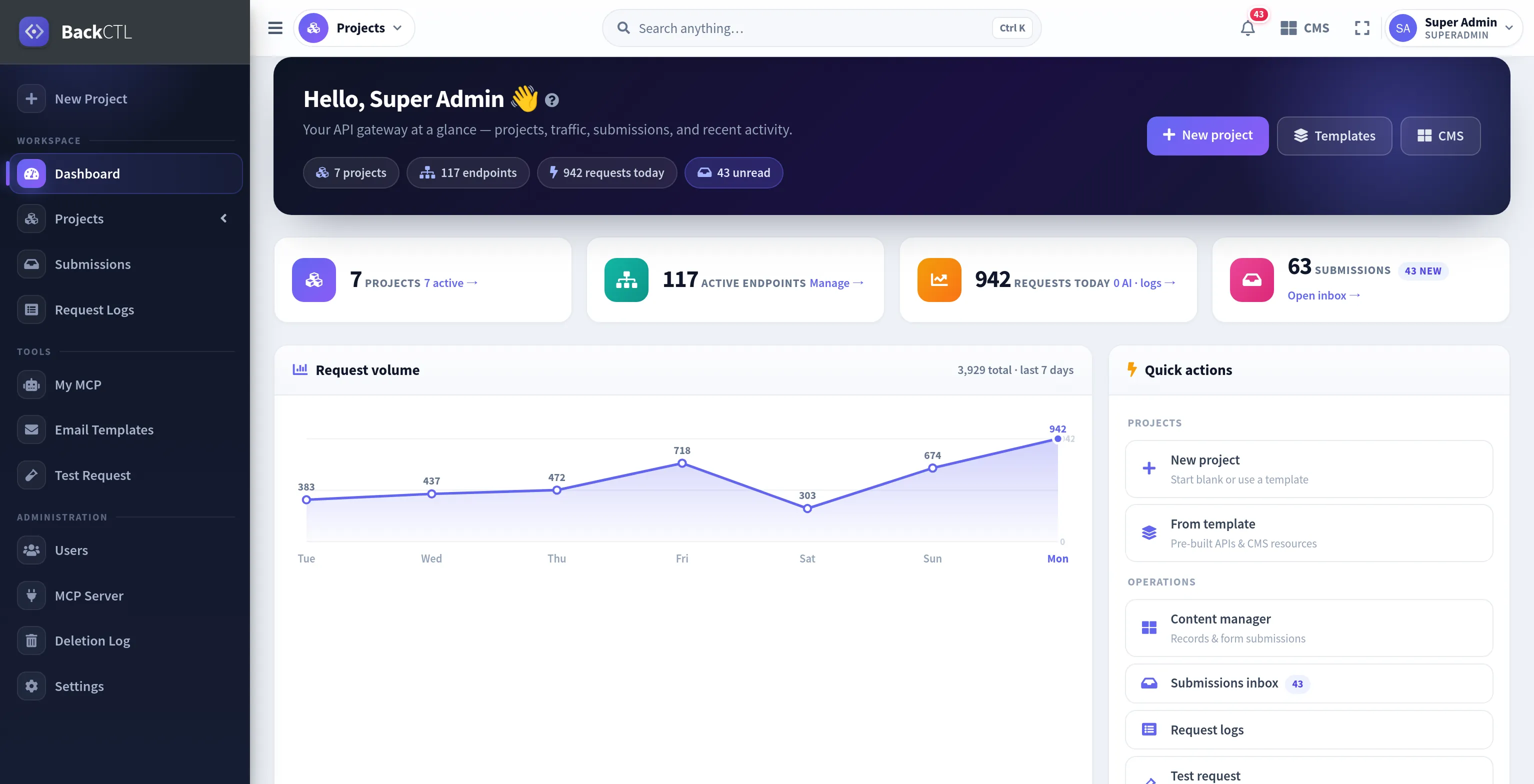
Every frame above is the real application, captured from this live install. Nothing redrawn, nothing mocked.
Four values, zero compromises.
Every feature on this page traces back to one of these. If a capability doesn't serve them, it doesn't ship.
Speed is a feature
Kickoff call to documented, production API in one afternoon. Templates scaffold, MCP fills gaps, docs write themselves.
✓ Empty → live in the 47s film aboveYou own everything
Self-hostable, full ZIP + SQL export, server-to-server migration. Leaving is easy, which is exactly why staying is safe.
✓ Zero lock-in, by designTransparent by design
AI translation shows its token cost before you click. Usage metering shows what each client costs. The stats below are live from this database.
✓ No surprise bills, no black boxesBattle-tested daily
Our own agency's client work runs on this exact install. Every feature exists because a real project needed it, and still uses it.
✓ We're our own biggest customerAutomation your clients can watch running.
A visual studio built into every project. Form lands → AI summarizes → email goes out → Slack pings, drawn as nodes, versioned like code, replayable step by step when something needs explaining.
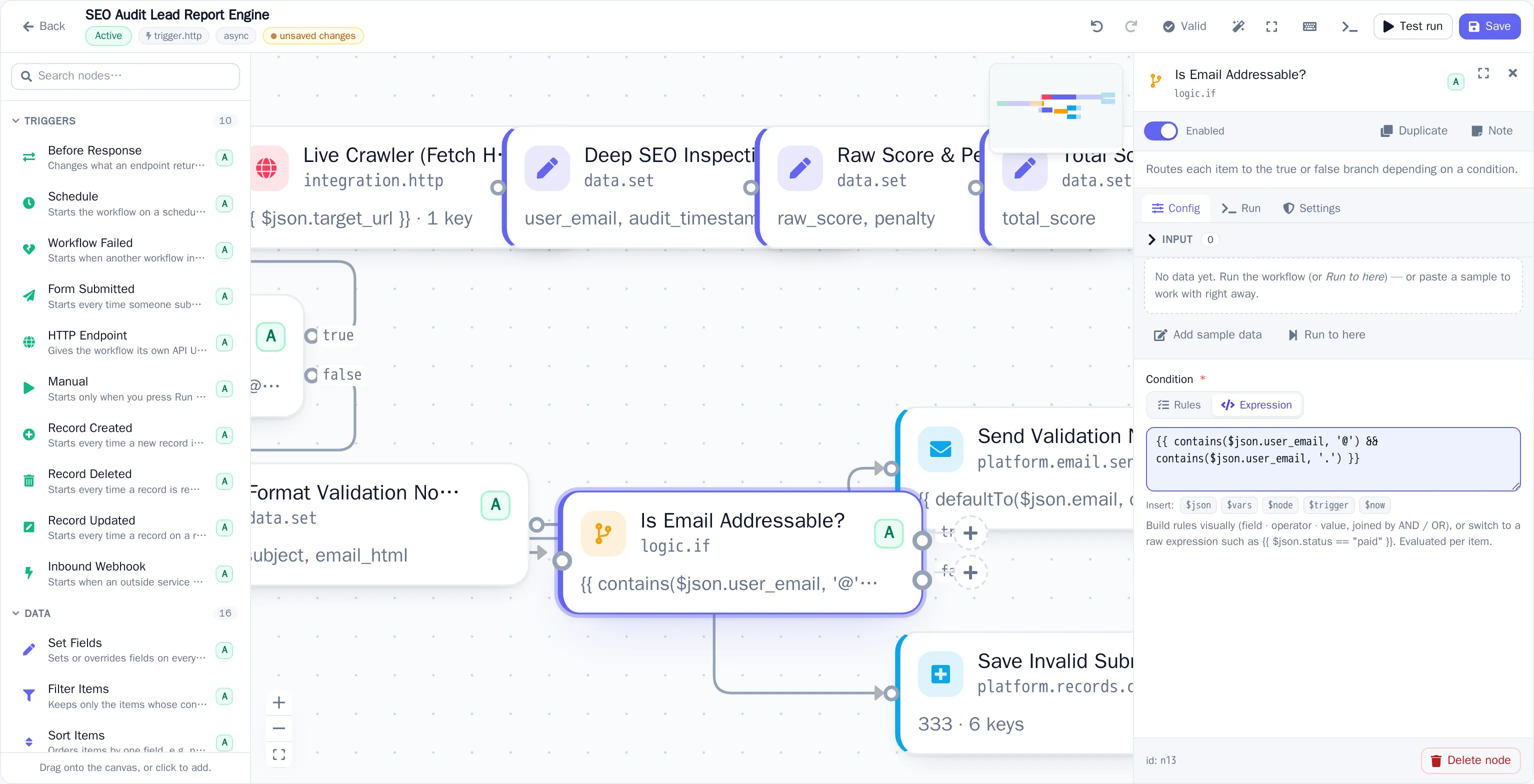 Real screenshot · this install
Your AI ships client backends in an afternoon.
The client call ends at 2pm. By 5pm there's a content model, a lead form, login with OTP, a triage workflow and a documented API your frontend dev can hit. Not a prototype: the production backend.
Brief your AI like a colleague
Paste your MCP URL into Claude, Cursor or ChatGPT once. Then: “New client: dental clinic, services + team pages, booking form, Swedish and English.” It builds, you watch.
Review in the panel
Everything the AI creates lands in your workspace: adjust a field, tighten validation, rewire a workflow node, flip on caching. Visual builders for whatever you'd rather click than describe.
Hand your frontend dev a link
API key + auto-generated docs. REST and GraphQL, filtering, embeds, i18n, draft preview. They start building against it the same day. Need a demo site? Deploy a preview in one click.
What “done by 5pm” actually looks like.
# Your AI, in Claude or ChatGPT, connected to your MCP URL (40+ tools):
You: New client: recipes site. Categories, photo uploads, login, Swedish + English.
AI:  create_project ✓  create_endpoint ×2 ✓  create_relationship ✓
     setup_auth ✓  configure_project(localization) ✓  create_workflow ✓  create_api_key ✓
AI:  Done. Docs at /docs/recipes. Want a preview site deployed too?
# Filter, search, sort, paginate: one consistent envelope
GET /api/gateway/client-project/products?filter[status]=published&sort=-created_at&per_page=10
Authorization: Bearer <api_key>

{ "success": true, "data": [ … ], "meta": { "total": 42, "page": 1, "has_more": true } }
# Auto-generated schema: nested relations in one round trip
POST /api/gql/client-project

{ posts(limit: 10, sort: "-created_at") { id title category { name } } }
# A form endpoint that answers through a workflow: the flow computes the response
POST /api/f/client-project/quote-request        # visitor submits the form

# → trigger: form.submitted  → AI: score & summarize  → branch  → respond
{ "success": true, "data": { "estimate": "$2,400–$3,100", "next_step": "call_booked" } }
Ten clients, one panel, zero babysitting.
Every client is an isolated project with its own keys, team and limits, but you run them all from one place, with one update path. The platform absorbs the work that used to eat your retainers.
Clients edit content without breaking things
Give each client a manager login scoped to exactly their content: 19 granular permissions, revision history for one-click undo, and draft preview links so “can you publish it so I can check?” never happens again. Handover is a login, not a runbook.
Busywork becomes a workflow
Lead triage, notifications, AI processing, approval chains, drawn as nodes in the visual studio, versioned with diffs, replayable per step. Even the form's HTTP response can come from a flow. See the engine →
Client work gets paid
Connect each client's own Stripe, PayPal, Razorpay, SSLCommerz, Flutterwave or 2Checkout; keys stay per project, webhooks signature-verified. The flow →
Client login portals, done
Registration, JWT sessions, social OAuth, email/SMS OTP: twelve ready-made endpoints per project, one click.
Preview sites in one click
Deploy a static demo (landing page, lead-capture site) straight from the panel or via MCP, hosted on a private URL you hand to the client.
Content that publishes itself
Schedule records to go live or expire at exact times. The campaign page appears Monday 09:00 without anyone logging in.
Every market's language
Locale fallback plus one-click AI translation with the cost shown up front. A second market is a button, not a sprint.
Know before the client does
Per-client usage metering and slow-request/error alerts to Slack or any webhook. You call them, not the other way around.
Take payments with your own gateway.
Connect Stripe, PayPal, Razorpay, SSLCommerz, Flutterwave or 2Checkout; keys stay per project, funds settle straight to your account. Tokenized, hosted checkout means card data never touches the backend, so you stay in the lightest PCI scope.
Your trusted amount, the gateway's API; never a client-supplied price.
Tokenized checkout or hosted page: card data goes browser → provider directly.
A signature-verified inbound webhook marks the order paid. Idempotent & auditable, and it can kick off a fulfillment workflow.
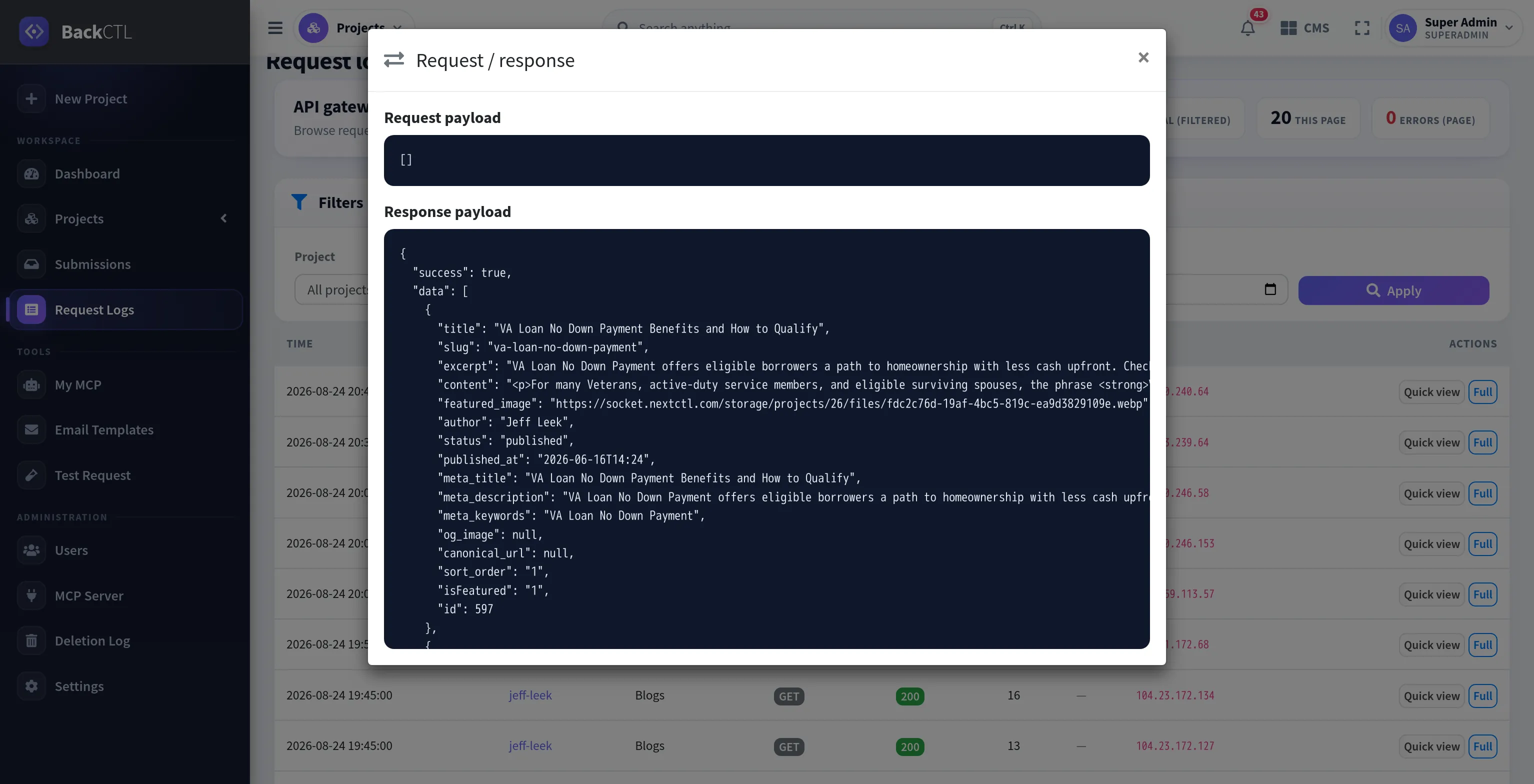
Every request leaves a paper trail.
Request fires, a log line appears, and one click opens the full request/response payload. This is the actual logs screen and the actual inspector, captured from this install's live traffic.
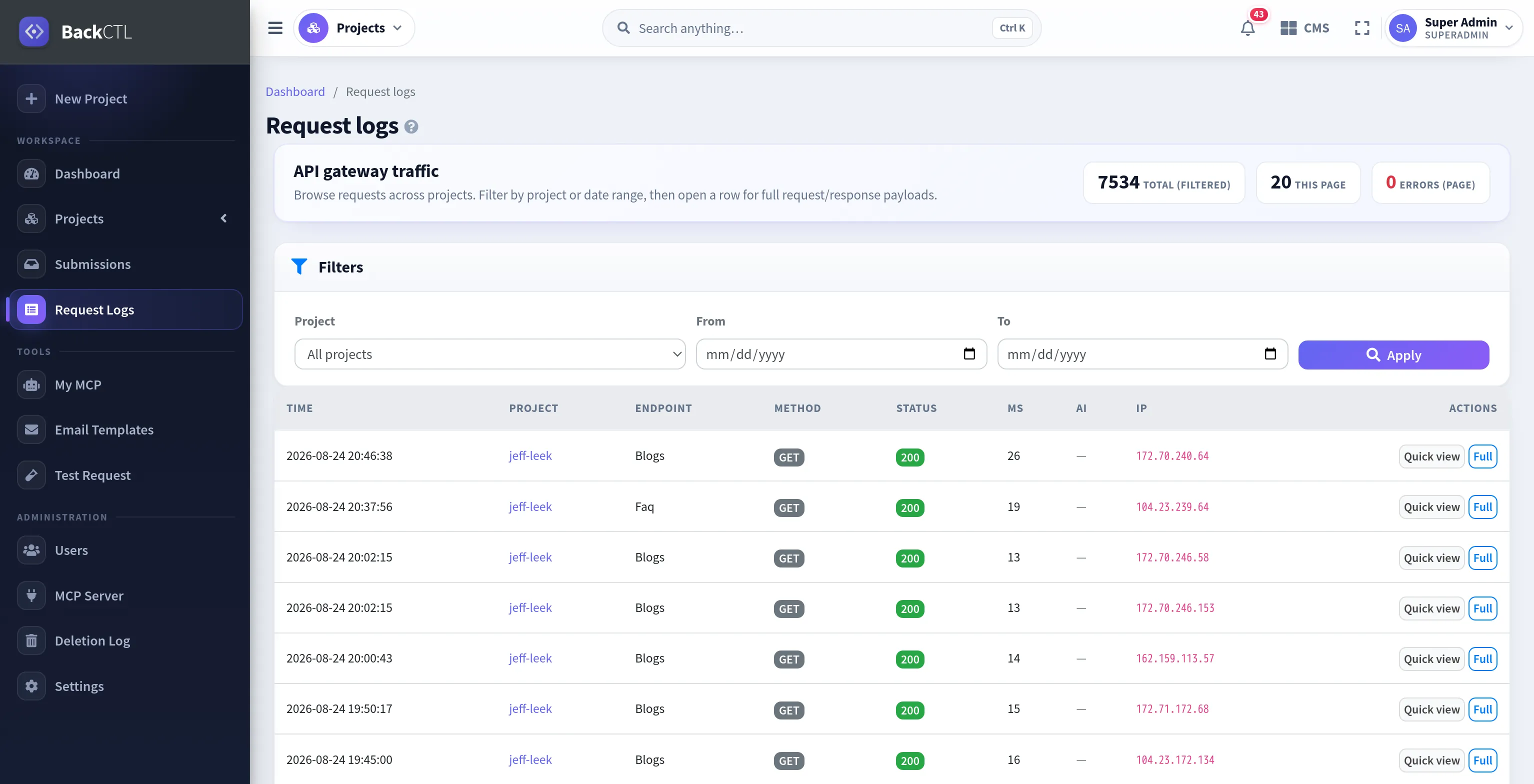 Live traffic
Enterprise-grade features. Zero configuration.
The unglamorous 80% of every client backend (metering, alerts, revisions, roles, caching) is already wired into each project. You toggle it in Settings; you never build it, and you never get paged for it.
The ROI isn't subtle.
A “simple” client backend is usually four subscriptions plus three weeks of glue code. Collapse it into one platform and the numbers compound with every client you take on.
Headless CMS ($99) + form service ($19) + auth provider ($25) + automation tool ($29) at typical list prices, all included in every project here.
Templates scaffold the model, MCP fills the gaps, the docs write themselves. The tour above goes empty → production in 47 seconds of real clicks.
Ten separate stacks ≈ 3 hours of patching and babysitting each, every month. One panel, one update path. Bill those hours instead.
Full ZIP + SQL export and server-to-server migration. Leaving is easy, which is exactly why staying is safe.
Your projects travel with you.
The whole project (schemas, content, files, settings, even email templates) exports to a portable archive. Move servers, hand off to a client, or keep cold backups.
One-file project export
A versioned ZIP with everything inside: endpoints, records, files, auth config, notification rules. Re-import it on any install and it just runs.
Server-to-server migration
Imports rewrite old URLs to the new host on the fly and keep every file's stored name; image links survive the move untouched.
SQL export
Prefer raw data? Take a per-project SQL dump for your own warehouse, audits, or plain peace of mind.
Pick a capability. See the real screen.
These are not illustrations. Each capability below opens the actual interface it ships with, captured from this install.
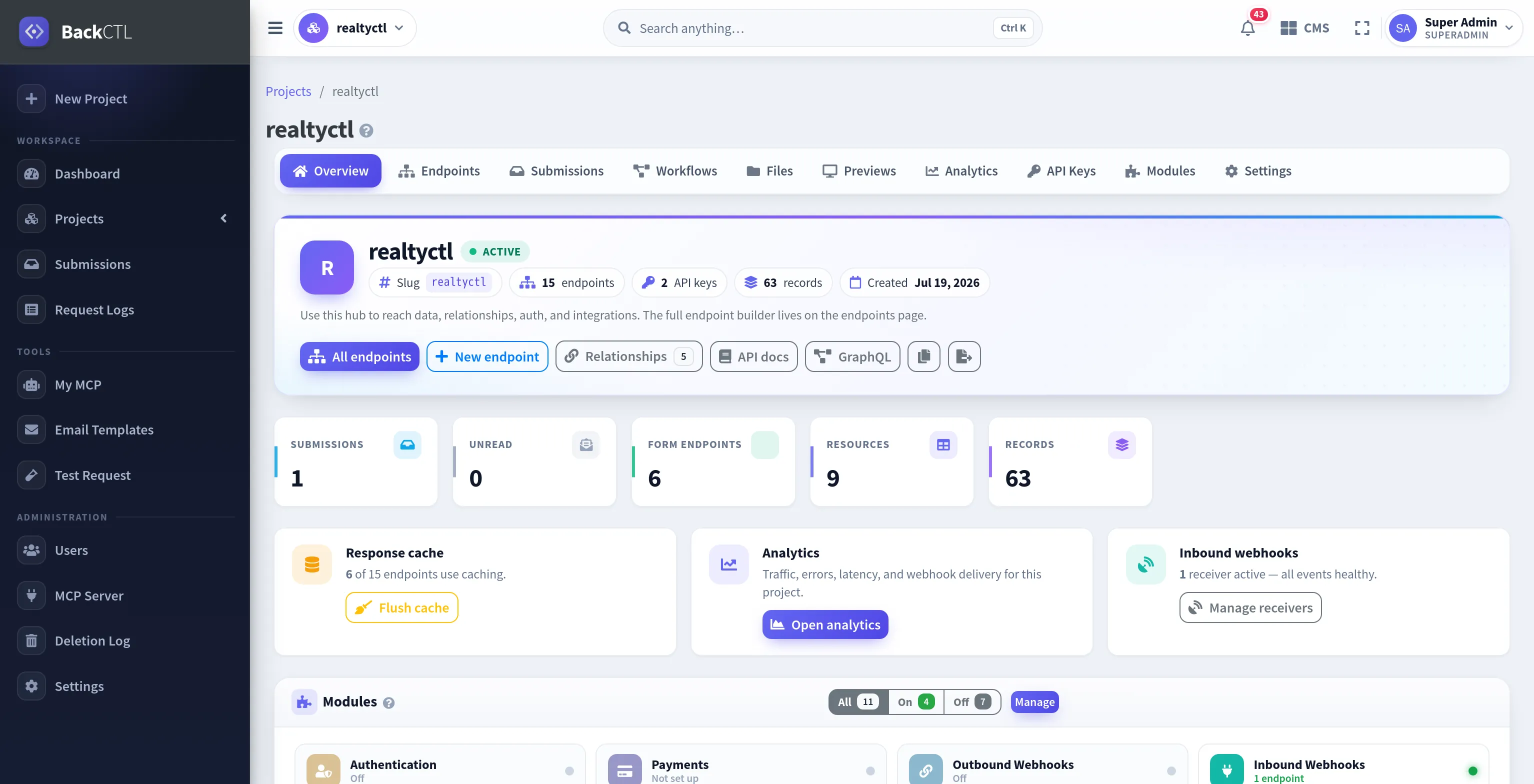
The project hub: endpoints, keys, records, webhooks and modules in one place
We run our agency's client backends on this exact install.
APIForge isn't a product we ship and walk away from. It runs NextCTL, our own agency. Dental clinic sites, voice-agent dashboards, lead-gen campaigns: every client backend lives on the platform you're looking at right now.
Why that matters to you
Every feature on this page exists because one of our client projects needed it: the manager role came from a dental client's front desk editing opening hours, the inbound-webhook verifier from wiring a voice agent's call events, the workflow engine from lead triage we got tired of doing by hand.
“If this platform goes down, our own client work goes down with yours. That's the SLA behind the SLA.”
Read the case studyCounted from this database when the page rendered, not a marketing slide.
Start free. Scale when it pays for itself.
Every plan includes the full platform: CMS, forms, auth, REST & GraphQL, webhooks and docs. You pay for scale, not for features held hostage.
- 1 project
- 10,000 requests / month
- 1 GB file storage
- 25 projects
- 100,000 requests / month
- 100 GB file storage
- 5 projects
- 100,000 requests / month
- 10 GB file storage
- Unlimited projects
- 0 requests / month
Prices in USD. Yearly billing saves ~20%. Limits are soft; we talk before anything stops working.
Answers, quickly.
?locale=sv; missing translations fall back to your default language. Editors translate manually or with the one-click AI translate button, which shows a token/cost estimate before running and saves drafts for review.Your next client kickoff could end with a working API.
Create the project, brief your AI, hand your frontend dev a documented backend, before the kickoff notes are typed up. It's faster to try than to read about.